WEB BUTTONS HOW TO'S
 |  |  |  |  |
 How To's
 Html Drop Line Menu
- Pulldown Menu Html
- Animated Collapsing Menu Css
- Html Sub Menu
- How To Create Cascading Menus
- Flash Collapse Menu Tutorial
- Bash Menu Script
- Create Menus In Bash
- Css Mouseover Menu Using Images
- Creating Bash Menus
- Vertical Submenu Script
- Extjs Submenu Example
- Expandable Menu
- Html Dropdown Menu Image
- Collapsible Menu Dojo
- Html Drop Down Menu Generator
 Features
 Online Help
  FAQ
FAQ


 |  |
QUICK HELP
Adjust appearance of the menu.
FOLDOUT MENUS
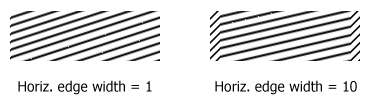
Create buttons in theme editor Create button... - to add new button to the current theme. After you click the "Create button" button, the "Create New Button" dialog will appear. Load image - to open button states image file (*.bmp) Horizontal and Vertical - to define edge width for each state. Edges are not scaled when you change the button size. Using edges is useful when you would like the button to have border. Then, if the border is within the edges, it won't be scaled. Central area is scaled in both directions. Corners are not scaled. Vertical edges are not scaled in vertical direction. That is, when you change the button height, vertical edges will not be scaled. And vice versa, horizontal edges are not scaled in horizontal direction. Let's change it's width to 150: As you can see, in the left image (Horiz. edge width = 1) whole button image was scaled to fit its new size. In the second case (Horiz. edge width = 10) left and right edges of the button were not scaled. Same with the vertical edge width. Save theme - to save theme changes. Move slider to find the color you like.
To open Theme editor right-click "Tools/Theme editor" in the Main menu. Theme editor helps you create your own themes or modify existing ones. To select a button you would like to edit, just lick it in the Themes toolbox.
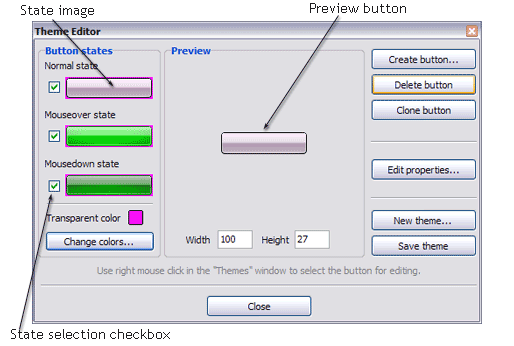

Total images - to define how many button state images are in the opened file. The button states image will then be divided into this number of state images.
State � offset fields - to set the state image for each Normal/Hot state of the button. If you set state offset to 0 then the topmost state image will be used for the state. If you set state offset to 1 then the second state image will be used etc. State 1 corresponds to the Normal state, state 2 - to the Hot state, state 3 - to the Pressed state.
Create button - to add the button to the current theme.
Delete button - to delete the button from the current theme.
Clone button - to create a copy of the button in the current theme.
Edit properties... - to edit the button state images' edge width. After you click the "Edit properties..." button, the "Button properties" toolbox will appear.
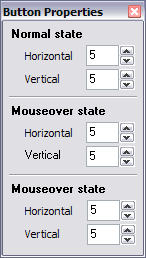
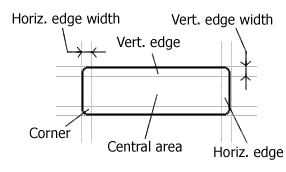
Example: Let's say, we have the following button (size: 50x50):

Transparent Color - to set the transparent color. When you add new button, transparent color is automatically set to match the color of the top-left corner of the button states image.
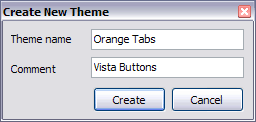
New theme... - to create a new theme. "Create New Theme" dialog will appear, where you should enter theme name and special notices (for example your copyright info, email, etc.).
Close - to close Theme editor.
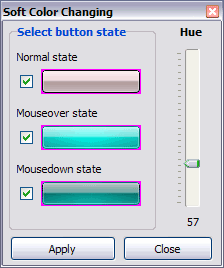
Change colors... - to exchange web button images colors. After clicking the "Color exchange" button, the "Color exchange" dialog will appear. Select the state(s) you want to be affected by clicking the checkbox next to the state image.
Wight and Height fields - to set the preview button size.
DESCRIPTION
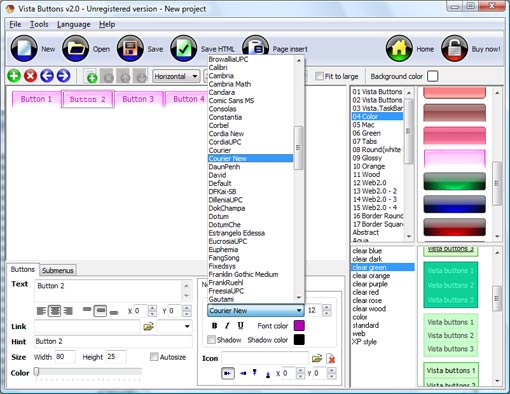
With Vista Web Buttons clear and comprehensible interface, you need just 4 simple steps to get your web buttons or html menu ready and if you use a pre-designed sample as a base you'll end up even faster!
 |  |  |
Not a string of code! Dissolving Pop Up Menu In Javascript
Compatibility 


Css Sub Menu Image
Agregar Layer Html Foldout Menus Seamless Integration
| |  |
RELATED
Fold Out External Menu : A slide-out menu that uses an external A DHTML menu bar that automatically slides open from the left edge of the screen as the surfer moves the mouse over it. Moving the mouse out will cause the bar to slide
horizontal vertical fold out website javascript menu Create horizontal or vertical fold out javascript menu for your website with this web tool.
Sunset Leather: Fold Out Menu Please enter your name and email address below to subscribe to our mailing list.
unobtrusive javascript to handle drop down/fold out menu unobtrusive javascript to handle drop down/fold out menu. Ask JavaScript / Ajax / DHTML questions and get answers from our community of JavaScript / Ajax / DHTML experts
TYPO3 - the Enterprise Open Source CMS: Documentation: Foldout � 2005-2010 TYPO3 Association All rights reserved
fold-out Menu script - JavaScript / Ajax / DHTML answers fold-out Menu script. Ask JavaScript / Ajax / DHTML questions and get answers from our community of JavaScript / Ajax / DHTML experts and professionals on BYTES.
Download Fold-out external menu - Fold-out external menu is a Fold-out external menu Fold-out external menu is a cool menu bar that automatically slides open from the left edge of the screen.
How To Create A Fold Out Menu Using Javascripts How To Create A Fold Out Menu Using Javascripts. Create professional graphics and images for your Website with Drop Down DHTML Menu!
Fold out menu to use with frames - HighDots Forums Hi, I'm looking for a menu that folds out to the right and that can be used with a frame without problems. It needs to be used in a page, that
Themenushop.com - Menu covers and restaurant accessories quality Holds six menu inserts priced from $37.95 per dozen.
Fold-out external menu Freeware Download - JavaScript, Scripts Free Download Fold-out external menu by Dynamic Drive - A slide-out menu that uses an external HTML page as its content, making updating it a breeze
TYPO3 - the Enterprise Open Source CMS: Documentation: Foldout This document is related to version 1.1.0 of the extension foldoutmenu.
Download Fold-out external menu Download the latest version of Fold-out external menu free. A slide-out menu that uses an external HTML page as its content, making updating it a breeze.
Javascript: Fold Out Menu with Image Overview of Nepal, map and photographs, links to Nepalese sites, resource on policing and beginner's javascript
TYPO3 - the Enterprise Open Source CMS: Documentation: Foldout � 2005-2010 TYPO3 Association All rights reserved
any way to add another layer of menu functionality in vbulletin? Fold out menus? any way to add another layer of menu functionality in vbulletin?
TYPO3 - the Enterprise Open Source CMS: Documentation: Foldout This document is related to version 1.1.0 of the extension foldoutmenu.
Dynamic Drive DHTML Scripts- Fold-out external menu A cool menu bar that automatically slides open from the left edge of the screen onmouseover.
How To Create A Fold Out Menu Using Javascripts How To Create A Fold Out Menu Using Javascripts. Create professional graphics and images for your Website with Drop Down DHTML Menu!
Dhtml Foldout Menu Problem Displaying Icon Arrow I'm having a problem displaying a little white icon arrow on my dhtml foldout menu.
Code rant: CSS Based Foldout Menus Mike Hadlow Based in Brighton, England, I work as a freelance programmer, specialising in enterprise application development with Microsoft tools.
Triple Pocket Heat Sealed 6 View Fold Out Menu Cover - 8-1/2in x Shop Instawares for Triple Pocket Heat Sealed 6 View Fold Out Menu Cover - 8-1/2in x 14in Risch, Vinyl, H Risch Menu Covers, Menu Covers by Manufacturer, Tabletop
horizontal vertical fold out website javascript menu Create horizontal or vertical fold out javascript menu for your website with this web tool.
Fold menu covers - Shop sales, stores & prices at TheFind.com This triple panel fold out Deluxe Sewn menu cover is constructed of clear rigid ten gauge vinyl pockets bound with a leatherette binding with color coordinating thread
TYPO3 - the Enterprise Open Source CMS: Documentation: Foldout � 2005-2010 TYPO3 Association All rights reserved
horizontal vertical fold out website javascript menu Create horizontal or vertical fold out javascript menu for your website with this web tool.
unobtrusive javascript to handle drop down/fold out menu unobtrusive javascript to handle drop down/fold out menu. Ask JavaScript / Ajax / DHTML questions and get answers from our community of JavaScript / Ajax / DHTML experts
Help Console Fold Out Menu. The fold out menu allows you to view content in the admin panel by simply dragging your mouse over the menu heading and clicking on the subsection you wish
Vertical Fold Out or Drop Down Menu I know I saw a post here that gave the url of a css vertical menu that expanded when you clicked, but I can't find it anywhere .. Anyone know a goos, SE friendly
Fold-out external menu Freeware Download - JavaScript, Scripts Free Download Fold-out external menu by Dynamic Drive - A slide-out menu that uses an external HTML page as its content, making updating it a breeze
MENU SAMPLES
Tabs Style 7 - Button MenuVista Style 8 - Menu Buttons
Cascading List Javascript Tabs Style 8 - Web Site Graphics
Tabs Style 3 - Buttons Images
XP Style Blue - Button Image
Tabs Style 2 - Web Buttons
Common Style 3 - Web Page Button
Dropdown Menu Html
Tabs Style 4 - Icons Buttons
SELECTED SAMPLE